Wednesday, 12 December 2018

Arduino GSM Jammer

Below is a simple  Arduino GSM Jammer ()
For 1800 MHz another VCO can be used.

The square wave from Arduino pin 10 fed to VCO tuning volt input which will almost cover the Required input voltage from 0.5 to 5 volts to cover the frequency range from 870 MHz to 980 Mhz
Arduino code for generating square wave 


void setup(){ }

void loop()
{
tone(10, 15000); // generate square wave
}


Click for video:


https://youtu.be/xLuq1X6kNps


1).MVCO944 (870 Mhz - 980 Mhz)

2). BFG591 or SXA389  RF Transistor 4-7GHz ,1.5 Watts

1).The transistor used in this project must be working on high frequencies , any other type transistor can be used.

Power supply must be 5vdc

Components used:

Wednesday, 14 November 2018

Generator start Timer ( on Low Battery capacity )

This simple project can set the generator in automatic way to start the generator on low battery level
specially for running network system


#include <LiquidCrystal.h>  //Default Arduino LCD Librarey is included

int Read_Voltage  = A0;
int Read_CUTOFF  = A1;
int led  = 8;
int led1  = 9;
const int rs = 12, en = 11, d4 = 5, d5 = 4, d6 = 3, d7 = 2; //Mention the pin number for LCD connection
LiquidCrystal lcd(rs, en, d4, d5, d6, d7);

void setup() {
  lcd.begin(16, 2); //Initialise 16*2 LCD
  pinMode(8, OUTPUT);
   pinMode(9, OUTPUT);
  lcd.print("KSF ELECTRONICS"); //Intro Message line 1
  lcd.setCursor(0, 1);

  delay(3000);
  lcd.clear();
}
void loop() {

 float Voltage_Value = analogRead(Read_Voltage);
 float CUTOFF_Value = analogRead(Read_CUTOFF);
Voltage_Value = Voltage_Value * (5.0/1023) * 6;
 CUTOFF_Value = CUTOFF_Value * (5.0/1023) * 6;

 lcd.setCursor(0, 0);
 lcd.print("VOLT="); lcd.print(Voltage_Value);
 lcd.print(" VDC ");
 lcd.setCursor(0, 0);
 lcd.print("VOLT="); lcd.print(Voltage_Value);


lcd.setCursor(0, 1);
 lcd.print("CUT ="); lcd.print(CUTOFF_Value);
 lcd.print(" VDC ");
 lcd.setCursor(0, 1);
 delay(200);

if(Voltage_Value < CUTOFF_Value)
digitalWrite(8 , HIGH);
delay(200000);
digitalWrite(8 ,LOW);
}

Thursday, 1 November 2018

Russian PI metal detector circuit.

Russian PI metal detector circuit.
Classical Russian PI detector where only few components were used working fine
LM555 , TL062 , IRF 740 or 840 . ( IXQT0460P2 in my case)

Contentious tone from speaker but change in tone if metal found 


Testing video click below link

Saturday, 6 October 2018

Arduino Bluetooth Remote Control (Home Appliances)

Very common Bluetooth Remote control

Programming Arduino Nano  from Arduino UNO 

1). Remove Atmega 328 from Arduino UNO 
2).  Connect Arduino UNO  pin RX to Arduino Nano RX
3).  Connect Arduino UNO  pin TX to Arduino Nano TX
4). Select COM 6 ,as Arduino UNO on COM 6


Simple programming but need to be updated 

#include <SoftwareSerial.h>
SoftwareSerial mySerial(10, 11); //Pin10 RX , Pin 11 TX connected to--> Bluetooth TX,RX
#define relay1 2
#define relay2 3
#define relay3 4
#define relay4 5
char val;
void setup() {
pinMode(relay1,OUTPUT);
pinMode(relay2,OUTPUT);
pinMode(relay3,OUTPUT);
pinMode(relay4,OUTPUT);
digitalWrite(relay1,HIGH);
digitalWrite(relay2,HIGH);
digitalWrite(relay3,HIGH);
digitalWrite(relay4,HIGH);
mySerial.begin(9600);
Serial.begin(9600);
}
void loop() {
//cek data serial from bluetooth android App
if( mySerial.available() >0 ) {
val = mySerial.read();
Serial.println(val);
}
//Relay is on


if( val == '1' ) {
digitalWrite(relay1,LOW); }
else if( val == '2' ) {
digitalWrite(relay2,LOW); }
else if( val == '3' ) {
digitalWrite(relay3,LOW); }
else if( val == '4' ) {
digitalWrite(relay4,LOW); }
//relay all on
else if( val == '9' ) {
digitalWrite(relay1,LOW);
digitalWrite(relay2,LOW);
digitalWrite(relay3,LOW);
digitalWrite(relay4,LOW);
}
//relay is off
else if( val == 'A' ) {
digitalWrite(relay1,HIGH); }
else if( val == 'B' ) {
digitalWrite(relay2,HIGH); }
else if( val == 'C' ) {
digitalWrite(relay3,HIGH); }
else if( val == 'D' ) {
digitalWrite(relay4,HIGH); }
//relay all off
else if( val == 'I' ) {
digitalWrite(relay1,HIGH);
digitalWrite(relay2,HIGH);
digitalWrite(relay3,HIGH);
digitalWrite(relay4,HIGH);
}
}

Thursday, 27 September 2018

CAR FAST MOBILE CHARGER

Below is a simple car mobile charger made from a classical power regulator IC 317
Here only 3 components were used ,
Which are LM317 ,560R, 5K (variable) .
Simply adjust voltages to 8.7 V DC (for fast Charging support mobiles).
Actually in adaptive fast charger there are 2 outputs 5V & 9V .Any mobile supporting fast
charging send a single to the a small chip inside charger ,which will switch 5V to 9V to mobile Set .


Sunday, 19 August 2018

ARDUINO FM RADIO

Here is a simple FM radio with Ardiuno  board ,
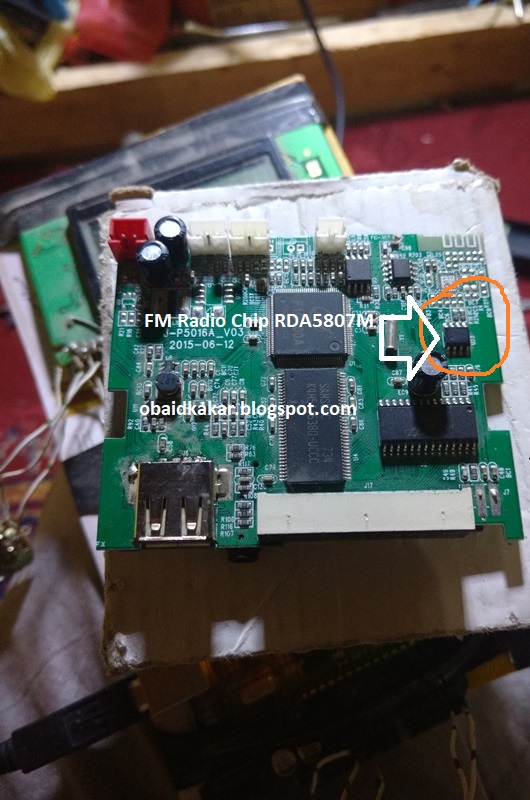
Which required popular Radio module called  RDA5807M.

The RDA5807M series support frequency range is from 50MHz to 115MHz.

Easily available in the market

i simply find this module in MP3 players available in the market ,

this modules is without 32khz crystal, you need to placed this crystal on the IC 6 pin & to the ground

You must have Libraries like -------Wire.h ----    TEA5767Radio.h   -------    LiquidCrystal.h   

Here in Code TEA5767Radio were used , it will support RDA5807M Chip.

Also remember these two pins must be proper

  * Arduino Pin A5  =  Radio Chip Pin SDA  
 * Arduino Pin A4   =  Radio Chip Pin SCL   


1 ----> Arduino SDA
2 ----> Arduino SCL
3 ----> GND
5 ----> +5V
6 ----> GND
7 ----> Audio out (right channel)
8 ----> Audio out (left channel)
10 ---> Antenna

 * LCD RS pin to digital pin 12
 * LCD Enable pin to digital pin 11
 * LCD D4 pin to digital pin 5
 * LCD D5 pin to digital pin 4
 * LCD D6 pin to digital pin 3
 * LCD D7 pin to digital pin 2
 * LCD R/W pin to ground
 * Arduino SDA PIN A5
 * Arduino SCL PIN A4
 * ends to +5V and ground
 * UP SEARCH (A0)
 * DOWN SEARCH (A1)
-----------------------------------------------------------------
#include <Wire.h>                             
#include <TEA5767Radio.h>                     
#include <LiquidCrystal.h>                   
                                             
                                             
TEA5767Radio radio = TEA5767Radio();         
LiquidCrystal lcd(12, 11, 5, 4, 3, 2);           
float frequency = 0;                         
int fUP = A0;                                 
int fDOWN = A1;                             
int count = 0;                                 


void setup()
{
  delay(1000);
  Wire.begin();
  frequency = 96.0;                       //starting frequency

  radio.setFrequency(frequency);
  lcd.begin(16,2);
  lcd.clear();
  lcd.setCursor(0,0);
  lcd.print("FM: ");
  lcd.setCursor(0, 1);
  lcd.print(frequency);

}

void loop()
{

  if(digitalRead(fUP))                   
  {
    count=0;
    while (digitalRead(fUP))
    {
      count++;
      if(count > 0 && count <= 6)       
      {
        frequency += 0.1;
        frequencyUpdate();
        delay(200);
      }
      else if (count > 6 && count <= 2) 
      {
        frequency += 0.1;
        frequencyUpdate();
        delay(80);
      }
      else                             
      {
        frequency += 0.1;
        frequencyUpdate();
        delay(5);
      }
    }

  }


   if(digitalRead(fDOWN))                 
   {
     count = 0;
    while (digitalRead(fDOWN))         
    {
      count--;
      if(count < 0 && count >= -6)
      {
        frequency -= 0.1;
        frequencyUpdate();
        delay(200);
      }
      else if (count < -6 && count >= -12)
      {
        frequency -= 0.1;
        frequencyUpdate();
        delay(80);
      }
      else                               
      {
        frequency -= 0.1;
        frequencyUpdate();
        delay(5);
      }
    }
   }

}


void frequencyUpdate()                    //this function changes the frequency of the station, is called by preset and frequency up/down conditions.
{
  frequency = constrain(frequency, 50.0, 115.0);     //50MHz to 115MHz.
  lcd.setCursor(0,0);
  lcd.print("KSF FM:");
  lcd.setCursor(0,1);
  lcd.print(frequency);
  radio.setFrequency(frequency);
}