Friday, 13 November 2020

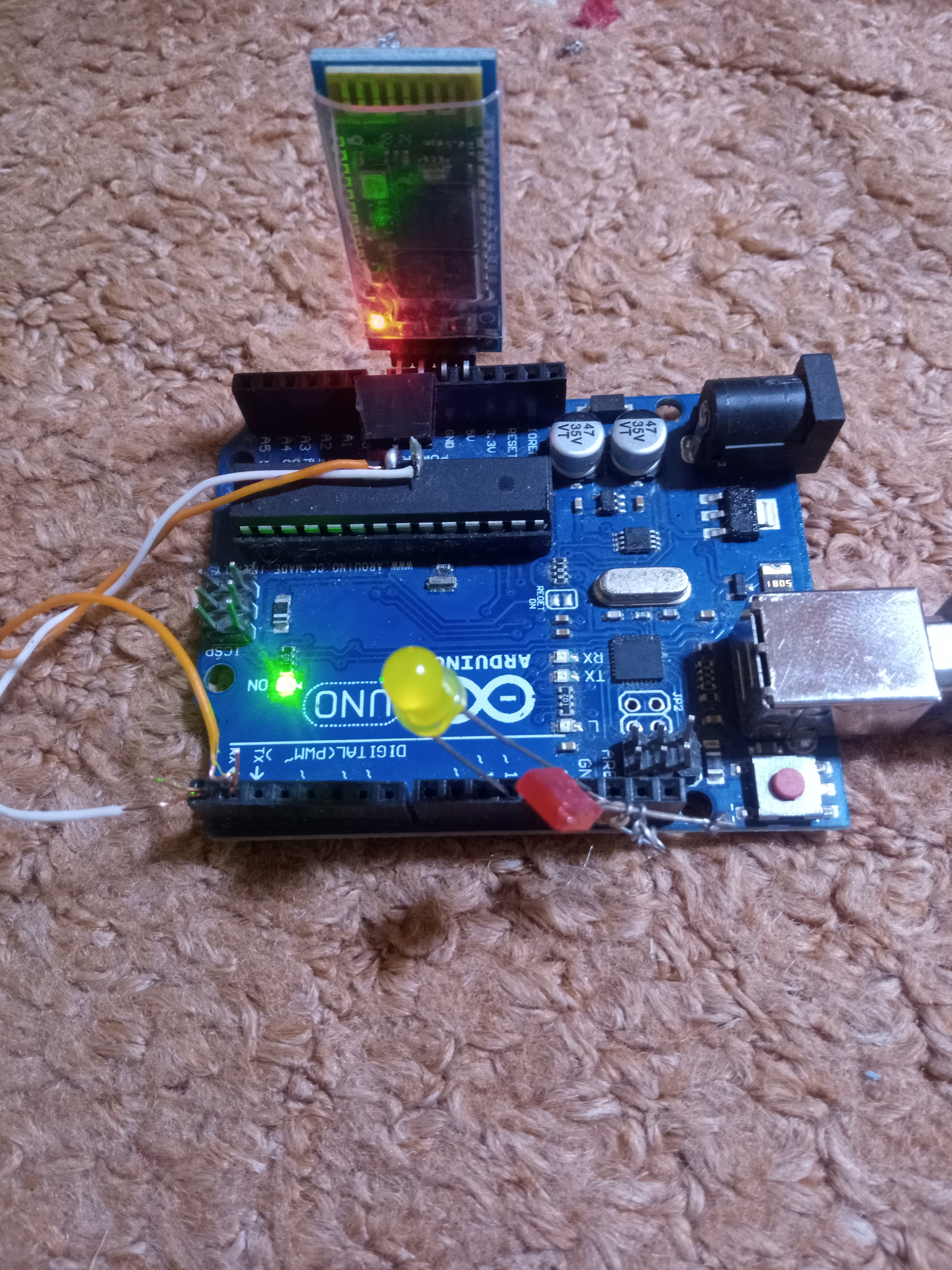
Arduino Bluetooth Remote control

Complete Bluetooth Remote control Project  

Arduino Bluetooth Remote control with APK

A great Bluetooth Remote control for your home automation , 


...............................................................................................

Check Video: 


https://m.youtube.com/watch?v=j2HYM4YbRK0


1). 1k Resister
              2). Any NPN transister
 3). 5 Volt Relay
     4). Arduino  nano
          5). Bluetooth module
            6). 5 volt power supply
                                              7). Arduino 6 & 7 pin used with bluetooth 


MIT Codes


Below are the Arduino codes 


#include <SoftwareSerial.h>
SoftwareSerial mySerial(2, 3); Bluetooth  module connected to 2,3 pins of ardiuno
#define relay1 A1
#define relay2 A2
#define relay3 A3
#define relay4 A4
char val;
void setup() {
pinMode(relay1,OUTPUT);
pinMode(relay2,OUTPUT);
pinMode(relay3,OUTPUT);
pinMode(relay4,OUTPUT);
digitalWrite(relay1,LOW);
digitalWrite(relay2,LOW);
digitalWrite(relay3,LOW);
digitalWrite(relay4,LOW);
mySerial.begin(9600);
Serial.begin(9600);
}
void loop() {
//cek data serial from bluetooth android App
while ( mySerial.available() >0 ) {
val = mySerial.read();
Serial.println(val);
}
//Relay is on


if( val == '1' ) {
digitalWrite(relay1,HIGH); }
else if( val == '2' ) {
digitalWrite(relay2,HIGH); }
else if( val == '3' ) {
digitalWrite(relay3,HIGH); }
else if( val == '4' ) {
digitalWrite(relay4,HIGH); }
//relay all on

//relay is off
else if( val == 'A' ) {
digitalWrite(relay1,LOW); }
else if( val == 'B' ) {
digitalWrite(relay2,LOW); }
else if( val == 'C' ) {
digitalWrite(relay3,LOW); }
else if( val == 'D' ) {
digitalWrite(relay4,LOW); }
//relay all off
}

Saturday, 7 November 2020

ATS (Auto Transfer Switch ) with 3 sources input


 ATS (Auto Transfer Switch ) with 3 sources input

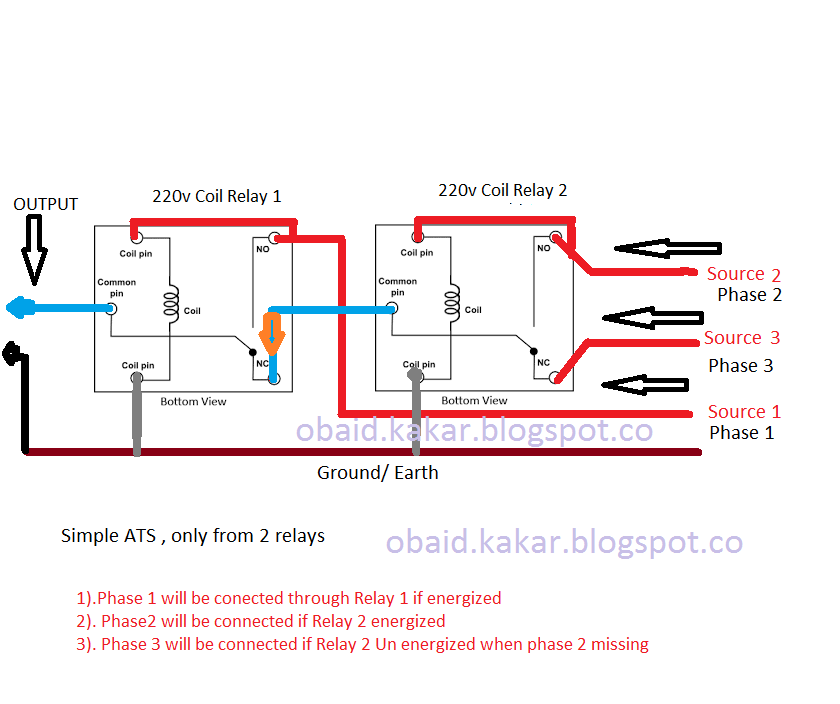
The clasical ATS system already shared by every one ,  but now a days we may need 3 thource ATS type through which we can manage the sources like hybrid power system   Mains power supply  , Generators, Solars , inverters ,  

If we look at the figure first of all source (S-1) will be connected as the relay will be energized through transformer which is connected to the Source (S-1), 

Failure of Source (S-1)  relay will not in the energized position , where common pin will be connected to relay (NC) pin , here NC pin is connected to the relay 2 common pin , 

If source (S-2 ) available relay 2 will be energized common pin will be connected to relay 2 (NO) ,

source (S-2) will be connected through NO pin then to Common of relay 2 ,then to NC of Relay 1 finally to output.

If source (S-2 ) unavailable relay 2 will be off , source (S-3) will be connected through NC of relay 2 then common pin then to the  NC or relay 1 finally to the output.

https://www.youtube.com/channel/UCo9zgx6UXdhBhpF51f5JjDw


SIMPLE IDEA


Saturday, 3 October 2020

How to Use External Microphone on Android Phones

Using any Android phone for recording video or audio it will not allow you to use external microphone or line input , but with simple modification you can enable the external microphone 
just by adding 6.8k resistor to both microphone wires will mute the internal microphone , and enable for external source inputs.
In video voice recorder were used for testing , internal microphone still found enabled while inserting the jack, 
But by adding resistor found that internal microphone disabled


Saturday, 4 April 2020

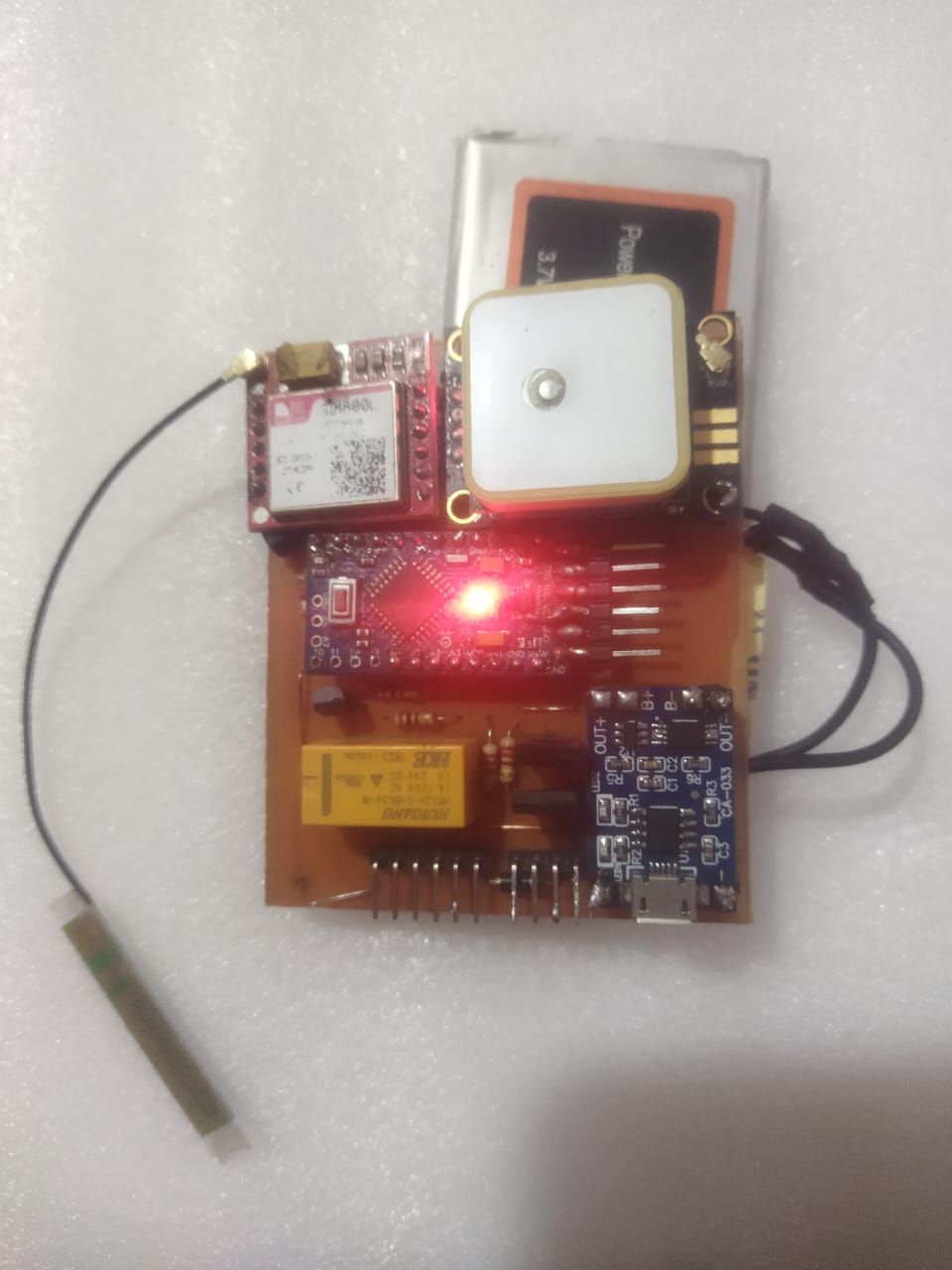
GPS Car Tracker

GPS Car Tracker 


Price: 20,000 PKR

No Annual charges with android App

Specifications.

 1). Track your car through GPS coordinates.
 2). Car door open alert.
 3). Car Bonnet open alert.
 4). Car Battery terminal open alert.
 5). Car engine On/Off.
 6). Car engine Start/Stop.
 7). Car Door lock Open/Close.
 8). Car Horn On/Off.
 9). Car Lights On/Off.
10). Built-in MIC.
11). Geofence
---------------------------------------------------------------------------------

Contact me at:


Whatsapp:  +923127800081

-------------------------------------------------------------------------------

PIM 2 Metal Detector:


---------------------------------


Check video:


https://www.youtube.com/watch?v=2HWzavLhwaA&t=54s


                                      Easy Andriod simple app 


In this project following parts were used1). micro controller Atmega328
2). Sim900A.
3). Neo GPS module
4). DC to DC boost power supply.
5). 12vdc to 5vdc converter (car charger).
6). 3.7V, 1800 mAh , (mobile battery).
7). 5V relays


Monday, 21 October 2019

FM Transmitter 25 Watts ( 88 - 108 MHz)

This Transmitter is made from the MP3 modulator with having 5 stages

with a maximum 25 Watts RF power


Driver circuit between modulator & RF section below 

coil will be  0.1 mH


Monday, 8 July 2019

Arduino Bluetooth Remote Control (Updated )

Arduino Bluetooth  Remote Control

Output taken from Ardiuno 2 & 4 pins, Bluetooth device connected at 6 & 7 pins

For 30Amps Relay 2SC1384 used connected to pin 2, C945 for 10 Amps Relay connected to pin 4 . In Android application Buttons 1 & 3 will work.
Search Bluetooth device first enter 0000 password, 
Now start app in Android  press connection button ,it will be green  below it show the connection status 
Then you on or off any Appliances


KIT: 3,000 PKR

#include <SoftwareSerial.h>
SoftwareSerial mySerial(7, 6);
#define relay1 2
#define relay2 3
#define relay3 4
#define relay4 5
char val;
void setup() {
pinMode(relay1,OUTPUT);
pinMode(relay2,OUTPUT);
pinMode(relay3,OUTPUT);
pinMode(relay4,OUTPUT);
digitalWrite(relay1,LOW);
digitalWrite(relay2,LOW);
digitalWrite(relay3,LOW);
digitalWrite(relay4,LOW);
mySerial.begin(9600);
Serial.begin(9600);
}
void loop() {
//cek data serial from bluetooth android App
while ( mySerial.available() >0 ) {
val = mySerial.read();
Serial.println(val);
}
//Relay is on


if( val == '1' ) {
digitalWrite(relay1,HIGH); }
else if( val == '2' ) {
digitalWrite(relay2,HIGH); }
else if( val == '3' ) {
digitalWrite(relay3,HIGH); }
else if( val == '4' ) {
digitalWrite(relay4,HIGH); }
//relay all on
else if( val == '9' ) {
digitalWrite(relay1,HIGH);
digitalWrite(relay2,HIGH);
digitalWrite(relay3,HIGH);
digitalWrite(relay4,HIGH);
}
//relay is off
else if( val == 'A' ) {
digitalWrite(relay1,LOW); }
else if( val == 'B' ) {
digitalWrite(relay2,LOW); }
else if( val == 'C' ) {
digitalWrite(relay3,LOW); }
else if( val == 'D' ) {
digitalWrite(relay4,LOW); }
//relay all off
else if( val == 'I' ) {
digitalWrite(relay1,LOW);
digitalWrite(relay2,LOW);
digitalWrite(relay3,LOW);
digitalWrite(relay4,LOW);
}
}